In my first week of learning to do physical computing with Arduino software and Raspberry Pico 2 W, I created a breadboard that had the following schematics:
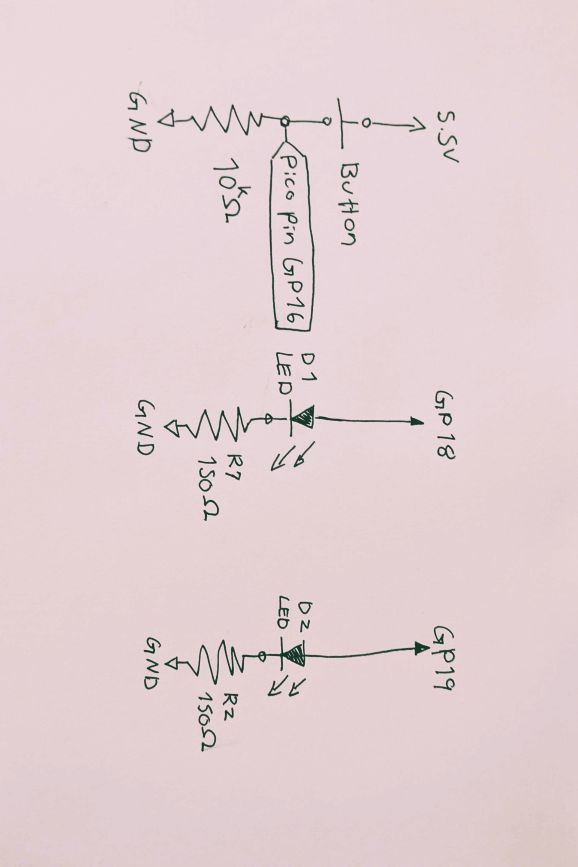
And this is what it looked on the board:
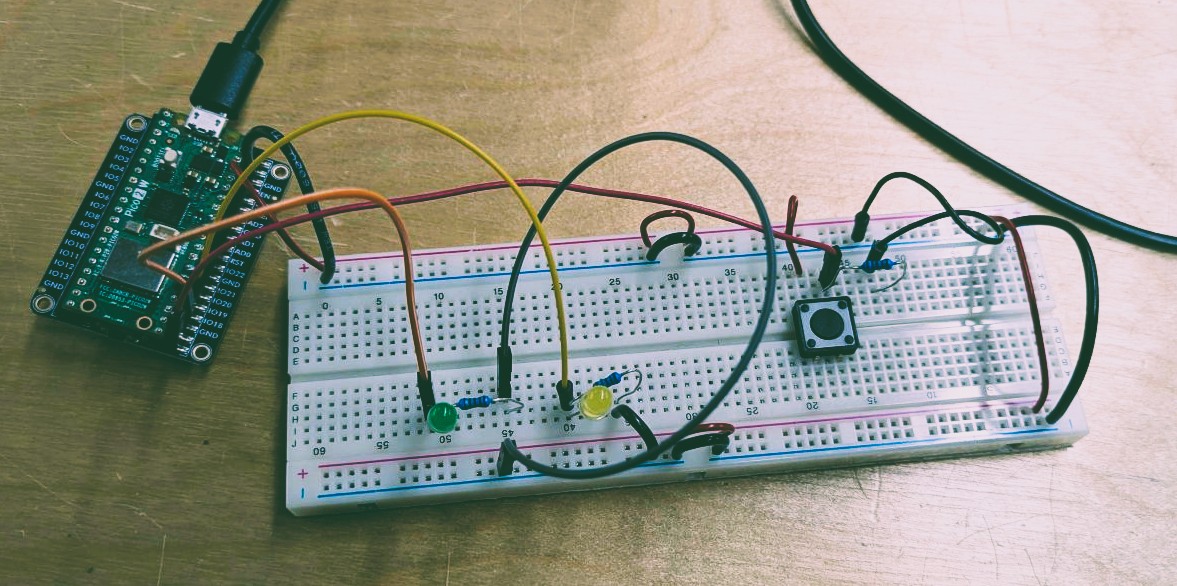
The board needed the following functionality:
- The lights should be off when the board is powered
- Upon first click of the button, one of the LEDs should turn on
- Upon the second click of the button, both LEDS should be turned on
- Upon the third click, both of the LEDs should turn off
The functionality was accomplished with the following code:
int button;

int buttonPress;

void setup() {
  // put your setup code here, to run once:

  pinMode(16, INPUT); // Button Pin

  pinMode(18, OUTPUT); // LED 1 pin
  pinMode(19, OUTPUT); // LED 2 pin

  digitalWrite(18, LOW); // Making sure the LEDS are off at the start of turning the device on
  digitalWrite(19, LOW);

  Serial.begin(9600);
}

void loop() {
  // put your main code here, to run repeatedly:

  button = digitalRead(16);
  Serial.println(button); // Checking if button is pressed or not

  // If button is pressed and the int index is 0 (not pressde before), turn on first LED and make int index 1
  if(button==HIGH && buttonPress == 0){
    digitalWrite(18, HIGH);
    digitalWrite(19, LOW);
    buttonPress = 1;
    delay(1000);
  }

  //Debugging if button index has changed
  button = digitalRead(16);
  Serial.println(button);
  Serial.println(buttonPress);

  // If button is pressed and the int index is 1 (pressed once before), turn the second LED on as well and turn the index to 2
  if (button==HIGH && buttonPress == 1){
    digitalWrite(18, HIGH);
    digitalWrite(19, HIGH);
    buttonPress = 2;
    delay(1000);
    Serial.println("Button Pressed, Int changed to 2");
  }

  //Debugging if button index has changed again
  button = digitalRead(16);
  Serial.println(button);
  Serial.println(buttonPress);

  //If button is pressed and the int index is 2(pressed twice before), turn the LEDS off and change the int index to 0 (start over again)
  if (button==HIGH && buttonPress == 2){
    digitalWrite(18, LOW);
    digitalWrite(19, LOW);
    buttonPress = 0;
    delay(1000);
  }
}
One improvement that can benefit this code is to tinker more with the delay.