Toaster the robot pigeon #
Description #
Toaster (or Toast, for short) is a cute, soft and approachable robot, who looks and acts like a pigeon begging for pets.
Toaster is made from the robot made on the course, with different behavior, and added touch and sound functionality, all covered in fleece. Toast mostly drives around aimlessly, making cooing noises. But when he detects something close ahead, he does a begging-motion (moving back and forth). If Toast doesn’t get any pets in a short while, he turns around and goes back to aimless wandering. If he does get pets though, he wiggles in place, while cooing.
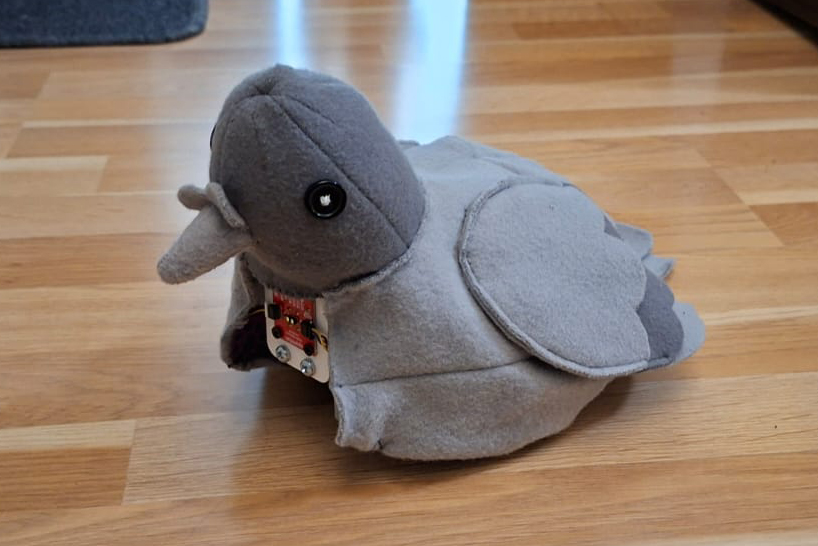
Construction process #
Starting with the robot made during the course, I modified it’s driving behavior to be more lifelike. The next step was to start trying out how the touch sensor worked and could be used, and modifying the code to work with this. The next part was to figure out how the robot would behave when being pet. I decided on wiggling, to reflect the real-life wing-flapping/shaking movement pigeons do when they are excited.
Next, I wanted to add sound. First using only a speaker, and then adding an amplifier as well. I used the library BackgroundAudio, that allowed me to stream audio from a website to the Pico. To play the pigeon mp3 that I had found on xeno-canto, I had to upload it to Dropbox, create a share-link, modify it so that it became a download link, and then use that as the “web radio” for the library. Getting the sound to work with everything else was probably the hardest part of this project code-wise. Parsing the important and not-important parts of the library-included example took quite a while, and after combining the essential parts with my original robot code, the program kept crashing randomly after about 10-15 seconds. This eventually just kind of stopped happening, so I’m still not quite sure what caused it.
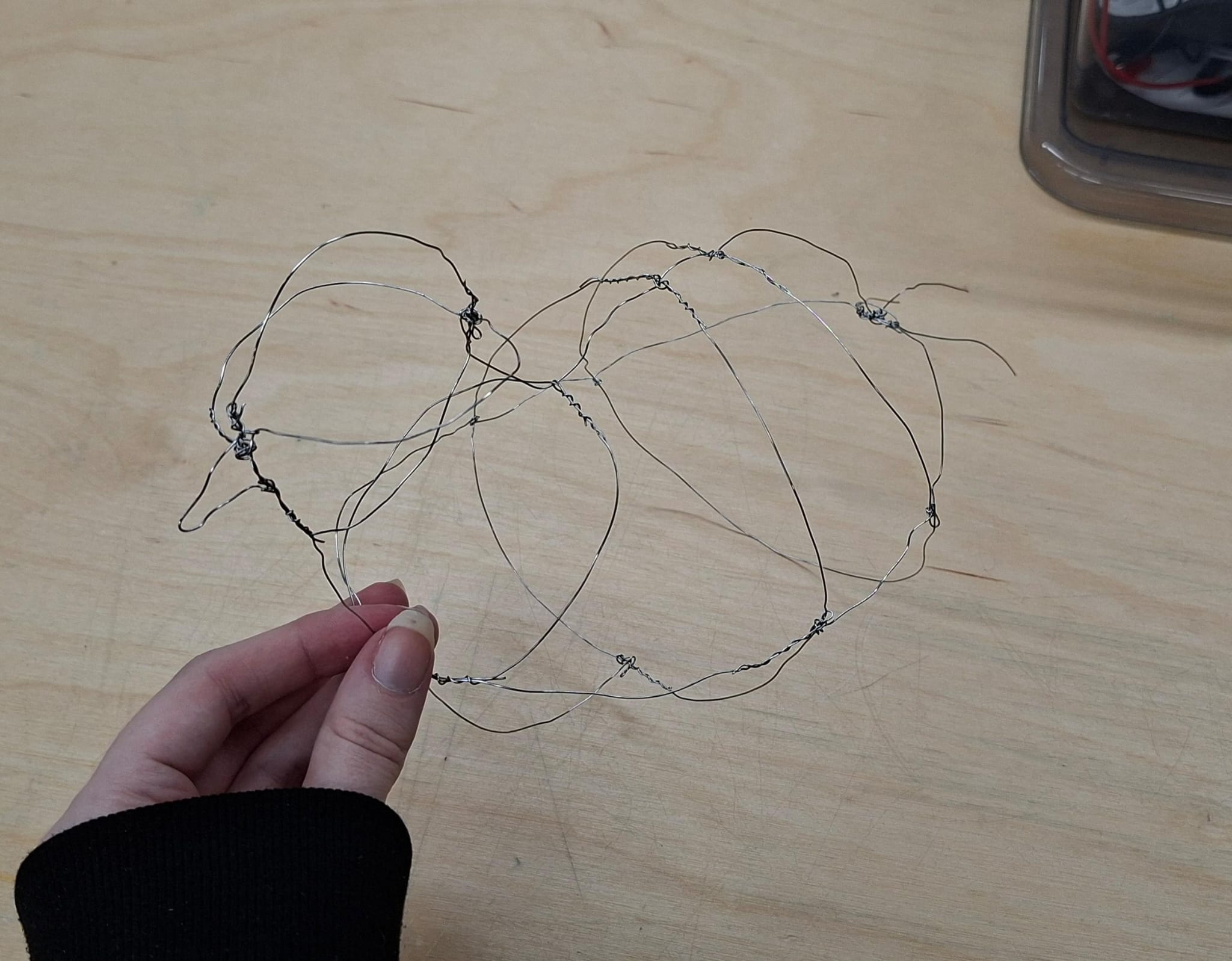
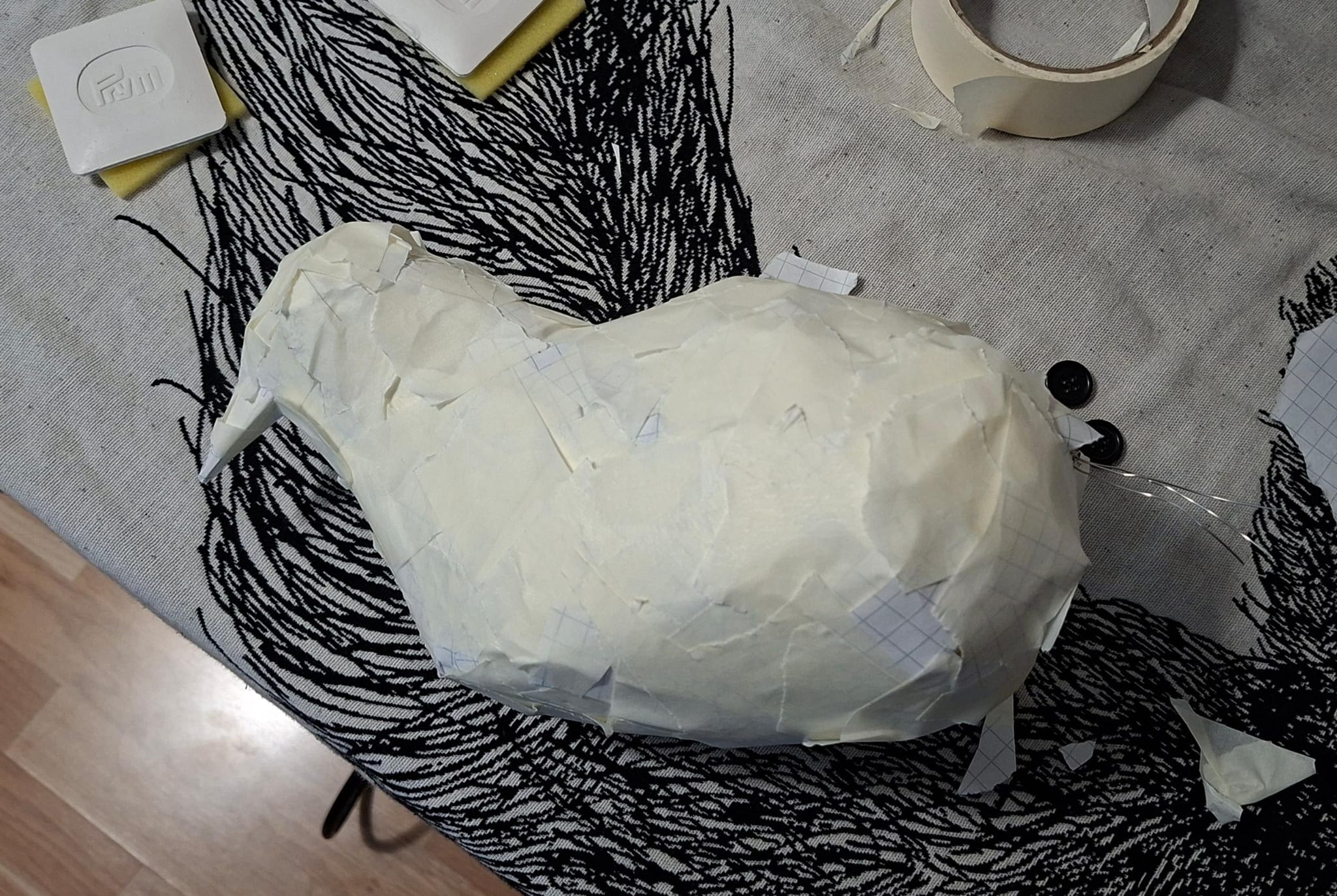
After all of the components were working, I turned my attention to making the cover for the robot. I made the shape of a pigeon out of wire, then covered it in paper and tape. After that I cut this open, separating the head/neck from the body, and into multiple flat pieces. Then I traced these pieces onto felt fabric, cut them, and sewed them together. After this, I realized that I had both made the neck way too short, and the body just a little bit too small.
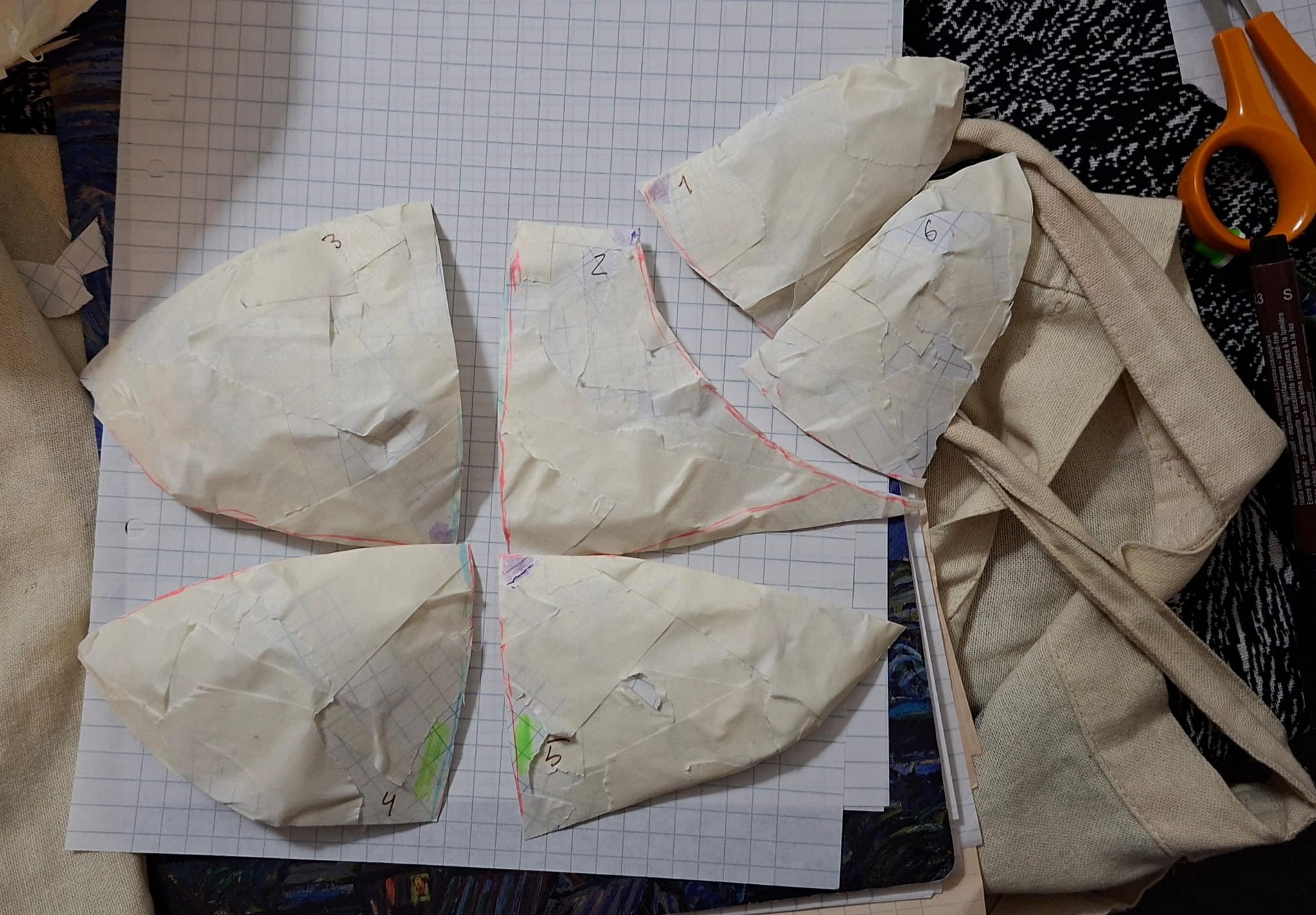
I was running out of time, so I had a small breakdown. I decided to forgo the pecking motion, and focus my efforts on making a slightly larger body for the pigeon. Attaching the head to the body also proved a bit difficult, as they were now different sizes, and I didn’t have time to remake the head as well. But, I worked out a decent-enough solution, but I would’ve wanted it to be a lot prettier. Next I attached the eyes, beak, wings and tail.
After the cover was finally done, and close-enough to the right size, I had to attach it to the robot. Attaching all of the different components to the robot base was something I definitely didn’t plan out enough, and since I was really running out of time, I just duct-taped everything together. It’s a mess…
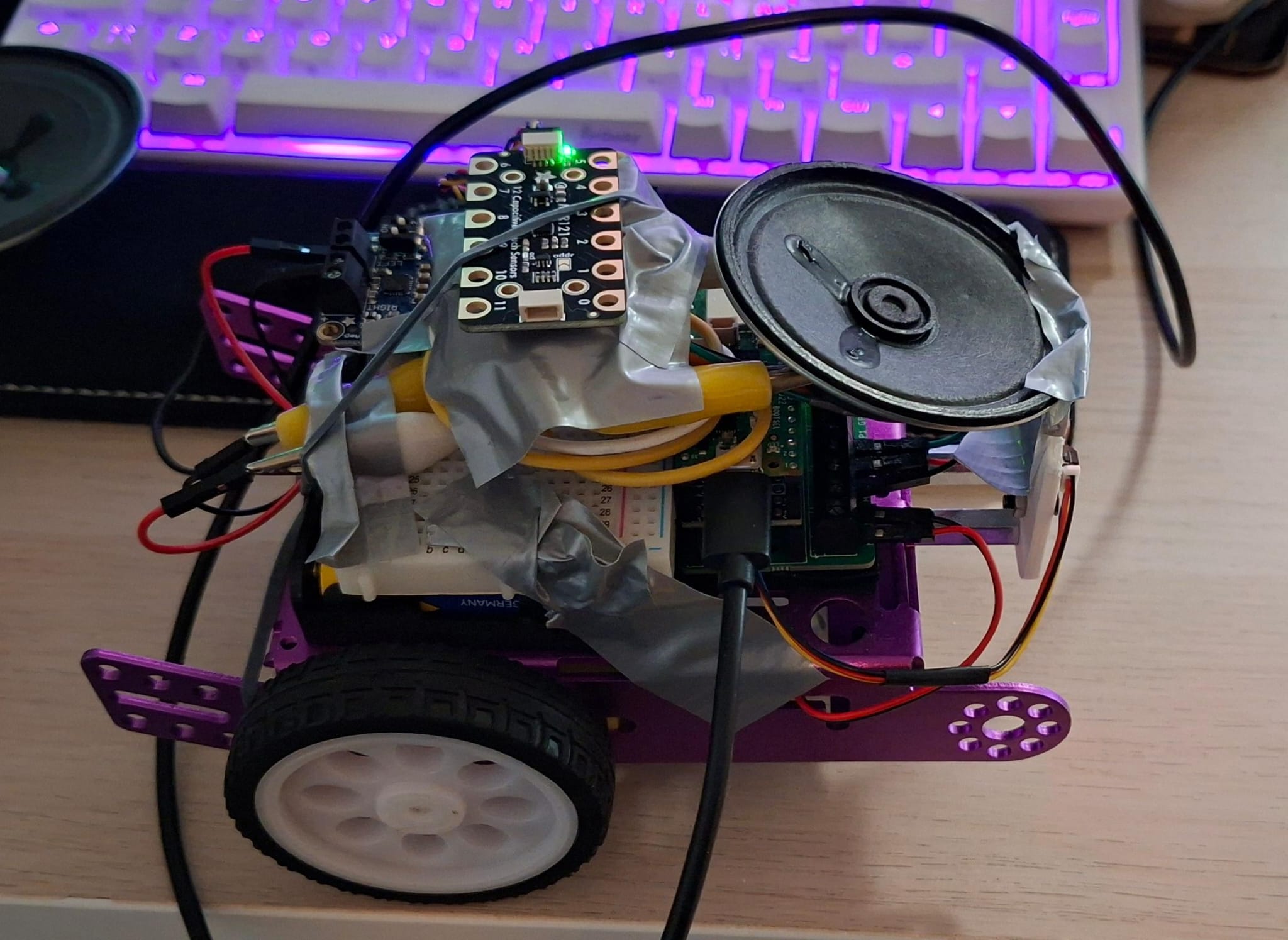
Now, after everything had been (not-so-securely) attached, I began testing out the touch-functionality. I realized that the fabric was too thick to get the capacitive touch sensor to recognize it was being touched. As I was testing out the petting with some tinfoil / wire, the sensor broke. This was the night before the presentations, which meant I wasn’t able to test it at all before the morning of the presentations. Just in case I wouldn’t be able to get a new sensor, and have a working version, I also made an alternative version of the code with no touch functionality, as a backup. Thankfully I didn’t have to use it! The sensor had started working again, but even in the final product, the area where it worked was quite small, and even when touching the right spot, the sensor worked pretty inconsistently.
Reflection #
As I have now been studying computer science for over three years, the coding part was usually kind of trivial (though I have to admit that I did write some pretty terrible code, even for the final project). Most parts were very easy to get working on their own, but I did struggle with combining different parts together, particularly trying to add the audio streaming into my, otherwise complete and working, robot code. It was really fun to finally use code to make something actually creative, and not just websites or coding assignments. Seeing the effects of my code on something that is actually in the physical space was also very rewarding.
Though, debugging and adjusting the behavior of the pigeon turned out to be pretty annoying, and I wish there would’ve been some way to test the movements of the robot without having to disconnect it from the computer first, and then moving it into a suitably large space to see how it was moving now.
Unlike working with code, I had not touched electronics since 7th grade (when I made a flashlight). I did remember more than I thought I did, and I picked (back) up how these things worked pretty quickly. I would’ve wanted to explore more different types of sensors and motors, but this course did kind of inspire me to maybe pick up a microcontroller for myself, so well see if I end up doing that by myself later…
All in all, I’m quite happy with what I accomplished with the short amount of time I had. I would’ve wanted to polish up some things, and add more features (mainly the pecking, I think I’m the most upset about not finishing that). But Toast did turn out a lot cuter than I imagined, and lots of people seemed to like him as well!
Future improvements #
-
Better construction under the cover (not just taped together, like it is now)
-
A nicer-looking attachment of the cover to the cart below
-
Make it peck!
-
Make the touching/petting work more consistently
-
Using something more stable for the audio (and something that doesn’t need me to write out the wi-fi name and password every time Toast is in a different place)
-
Quieter motors, so the audio is clearer
- Also better audio quality in general, maybe using a better quality speaker & amplifier? And/or cleaning up the background noise from the audio file
-
Figure out why it crashes sometimes and fix that :D
Code #
#include <Wire.h>
#include <VL53L1X.h>
#include "Adafruit_MPR121.h"
#include <Servo.h>

// Audio
#include <WiFi.h>
#include <HTTPClient.h>
#include <BackgroundAudio.h>
#include <WebServer.h>

#ifndef STASSID
#define STASSID "wifi name"
#define STAPSK "wifi password"
#endif

const char *ssid = STASSID;
const char *pass = STAPSK;

#ifdef ESP32
#include <ESP32I2SAudio.h>
ESP32I2SAudio audio(4, 5, 6);  // BCLK, LRCLK, DOUT (, MCLK)
// Or for 1-pin PDM with external LPF
//#include <ESP32PDMAudio.h>
//ESP32PDMAudio audio(5);
#else
#include <I2S.h>
#include <PWMAudio.h>
// Uncomment either the PWM or I2S version, being sure to adjust the PWM pin or (BCLK,DATA) pins.
//I2S audio(OUTPUT, 0, 2);
PWMAudio audio(0);
#endif

#ifdef ESP32
// The ESP32 devices seem to have very variable HTTP performance.  Increase the buffer here to sort-of compensate
#define STREAMBUFF (32 * 1024)
#else
// Pico and PicoW work well with much smaller compressed/raw buffer...
#define STREAMBUFF (16 * 1024)
#endif

// Instantiate a MP3 player with the specified raw (compressed) data buffer
BackgroundAudioMP3Class<RawDataBuffer<STREAMBUFF>> mp3(audio);

#ifdef ESP32
NetworkClientSecure client;
#else
WiFiClientSecure client;  // Because URL is HTTPS, need a WiFiSecureClient.  Plain HTTP can use WiFiClient
#endif

String url = "https://dl.dropbox.com/scl/fi/dxclguwijtaei3vyjbaba/Pigeon.mp3?rlkey=k22t5vjdl7xcz6jyepeqxwbxw&st=wz1z9mdj";  // Check out https://fmstream.org/index.php?c=FT for others
HTTPClient http;
uint8_t buff[512];  // HTTP reads into this before sending to MP3
WebServer web(80);

int icyMetaInt = 0;
int icyDataLeft = 0;
int icyMetadataLeft = 0;
int gain = 100;
String status;

void ConnectWiFi() {
#ifndef ESP32
  WiFi.end();
#endif
  Serial.print("Connecting to WiFi...");
  WiFi.begin(ssid, pass);
  while (!WiFi.isConnected()) {
    Serial.print("..");
    delay(100);
  }
  Serial.print("http://");
  Serial.println(WiFi.localIP());
  web.begin();
}

// Robot setup
VL53L1X sensor;
Adafruit_MPR121 touchSensor = Adafruit_MPR121();
int distance;
int distanceThreshold = 350;
int distanceThreshold2 = 100;
//Servo myservo;


bool touched = false;
int i = 0;  // wiggle counter

int nearObjectCounter = 0;

//int servoPos = 0;

// pins for MOTOR 1
int M1_C1 = 2;
int M1_C2 = 3;

// pins for MOTOR 2
int M2_C1 = 6;
int M2_C2 = 7;

// speed of the motors
int speed = 140;

// motor functions
// MOTOR 1

void motorOneForward() {
  analogWrite(M1_C1, speed);
  analogWrite(M1_C2, 0);
}

void motorOneReverse() {
  analogWrite(M1_C1, 0);
  analogWrite(M1_C2, speed);
}

void motorOneStop() {
  analogWrite(M1_C1, 0);
  analogWrite(M1_C2, 0);
}

// MOTOR 2

void motorTwoForward() {
  analogWrite(M2_C1, speed);
  analogWrite(M2_C2, 0);
}

void motorTwoReverse() {
  analogWrite(M2_C1, 0);
  analogWrite(M2_C2, speed);
}

void motorTwoStop() {
  analogWrite(M2_C1, 0);
  analogWrite(M2_C2, 0);
}

void goForward() {
  motorTwoForward();
  motorOneForward();
}

void goReverse() {
  motorTwoReverse();
  motorOneReverse();
}

void goLeft() {
  motorOneForward();
  motorTwoReverse();
}

void goRight() {
  motorTwoForward();
  motorOneReverse();
}

void stopAll() {
  motorTwoStop();
  motorOneStop();
}

void turnAround() {
  if (random(2) == 0) {
    goLeft();
  } else {
    goRight();
  }
  delay(500);
  stopAll();
}

void wiggle() {
  goLeft();
  delay(200);
  goRight();
  delay(200);
  stopAll();
}

/*void peck(int pecks) {
  for (int i = 0; i < pecks; i++) {
    for (servoPos = 0; servoPos <= 160; servoPos += 10) {  // goes from 0 degrees to 160 degrees
      myservo.write(servoPos);                             // tell servo to go to position in variable 'pos'
      delay(10);                                           // waits 15 ms for the servo to reach the position
    }
    for (servoPos = 160; servoPos >= 0; servoPos -= 10) {  // goes from 160 degrees to 0 degrees
      myservo.write(servoPos);                             // tell servo to go to position in variable 'pos'
      delay(10);                                           // waits 15 ms for the servo to reach the position
    }
  }
}*/

void setup() {
  Serial.begin(115200);
  //delay(5000);
  client.setInsecure();  // Don't worry about certs, just use encryption
  mp3.begin();
  //mp3.pause();

  // change the pins to outputs
  pinMode(M1_C1, OUTPUT);
  pinMode(M1_C2, OUTPUT);
  pinMode(M2_C1, OUTPUT);
  pinMode(M2_C2, OUTPUT);

  // make sure that the motors are stopped in the beginning
  stopAll();

  // Setup distance sensor
  Wire.begin();
  Wire.setClock(400000);  // use 400 kHz I2C
  sensor.setTimeout(500);
  if (!sensor.init()) {
    Serial.println("Failed to detect and initialize sensor!");
    while (1)
      ;
  }

  // Setup touch sensor
  Serial.println("Adafruit MPR121 Capacitive Touch sensor test");
  // Default address is 0x5A, if tied to 3.3V its 0x5B
  // If tied to SDA its 0x5C and if SCL then 0x5D
  // &Wire1 is needed for Arduino Uno R4
  while (!touchSensor.begin()) {
    Serial.println("MPR121 not found, check wiring?");
    delay(500);
  }
  Serial.println("MPR121 found!");

  // ROI settings
  // 195 is the center of the array
  sensor.setROICenter(195);
  int center = sensor.getROICenter();
  Serial.print("ROI center: ");
  Serial.println(center);
  // the smallest size for the ROI is 4x4
  sensor.setROISize(16, 8);

  // Start continuous readings at a rate of one measurement every 33 ms (the
  // inter-measurement period). This period should be at least as long as the
  // timing budget.
  sensor.setDistanceMode(VL53L1X::Medium);
  sensor.setMeasurementTimingBudget(33000);  // time is in microseconds
  sensor.startContinuous(33);                // time is in milliseconds

  //myservo.attach(27);

  // Audio
  client.setInsecure();

  mp3.begin();
}

void loop() {
  // read the sensor data
  sensor.read();
  distance = sensor.ranging_data.range_mm;
  //Serial.print("distance:");
  //Serial.println(distance);

  // Audio
  static uint32_t last = 0;

  // Ensure WiFi is up.  If not, retry
  if (!WiFi.isConnected()) {
    ConnectWiFi();
    return;
  }

  web.handleClient();

  // If the HTTP stream drops, reconnect
  if (!http.connected()) {
    stopAll();
    Serial.println("Stopped");
    Serial.printf("(Re)connecting to '%s'...\n", url.c_str());
    http.end();
    http.begin(client, url);
    http.setReuse(true);
    http.setFollowRedirects(HTTPC_FORCE_FOLLOW_REDIRECTS);
    const char *icyHdrs[] = { "icy-metaint" };  // What is the MD interval?
    http.collectHeaders(icyHdrs, 1);
    http.addHeader("Icy-MetaData", "1");
    int code = http.GET();
    if (code != HTTP_CODE_OK) {
      http.end();
      Serial.printf("Can't GET: '%s'\n", url.c_str());
      delay(1000);
      return;
    }
    if (http.hasHeader("icy-metaint")) {
      icyMetaInt = http.header("icy-metaint").toInt();
      icyDataLeft = icyMetaInt;
    } else {
      icyMetaInt = 0;
    }
  }


  // Pump the MP3 player data.  Read what's available from the web and send to the MP3 object
  WiFiClient *stream = http.getStreamPtr();
  do {
    size_t httpavail = stream->available();
    httpavail = std::min(sizeof(buff), httpavail);  // We can only read up to the buffer size
    size_t mp3avail = mp3.availableForWrite();
    if (!httpavail || !mp3avail) {
      break;
    }
    size_t toRead = std::min(mp3avail, httpavail);  // Only read as much as we can send to MP3
    if (icyMetaInt) {
      toRead = std::min(toRead, (size_t)icyDataLeft);
    }
    int read = stream->read(buff, toRead);
    if (read < 0) {
      return;  // Error in the read
    }
    mp3.write(buff, read);

    // If we drop too low, pause playback to let us catch up
    if (mp3.available() < 1024) {
      mp3.pause();
    } else if (mp3.paused() && mp3.available() > (STREAMBUFF / 2)) {  // When paused wait until kind-of full before restarting
      mp3.unpause();
    }

    icyDataLeft -= read;
    if (icyMetaInt && !icyDataLeft) {
      while (!stream->available() && stream->connected()) {
        delay(1);
      }
      if (!stream->connected()) {
        return;
      }
      int totalCnt = stream->read() * 16;
      int cnt = totalCnt;

      // Read up to buff[] of metadata
      int buffCnt = std::min(sizeof(buff), (size_t)cnt);  // The size of data to stuff in buff[]
      uint8_t *p = buff;
      while (buffCnt && stream->connected()) {
        read = stream->read(p, buffCnt);
        p += read;
        buffCnt -= read;
        cnt -= read;
      }

      // Throw out the rest
      while (cnt && stream->connected()) {
        stream->read();  // Throw out metadata larger than 512b buffer
        cnt--;
      }
      if (totalCnt) {
        buff[std::min(sizeof(buff) - 1, (size_t)totalCnt)] = 0;
        Serial.printf("md: '%s'\n", buff);
      }
      icyDataLeft = icyMetaInt;
    }
  } while (true);

  // Can do UI processing, etc. at this point  Just be sure to run loop() often enough to get the 20-30KB/s of transfers needed for MP3 streaming
  if ((millis() - last) > 1000) {
    last = millis();
    sprintf((char *)buff, "buffer: %d, frames %lu, shifts %lu, underflows %lu, errors %lu, dumps %lu, uptime %lu", mp3.available(), mp3.frames(), mp3.shifts(), mp3.underflows(), mp3.errors(), mp3.dumps(), last);
    Serial.println((char *)buff);
    status = (char *)buff;
  }

  // Sensor reading: has the robot been touched
  for (int i = 0; i < 12; i++) {
    if (touchSensor.filteredData(i) < 15) {
      Serial.println("Touched!");
      touched = true;
    }
  }

  if (touched) {
    i += 1;
    speed = 100;
    wiggle();
    Serial.println("Wiggling");
  } else if (distance > distanceThreshold) {  // if nothing is close
    Serial.println("Forward");
    goForward();
    if (random(40) == 1) {
      Serial.println("Left");
      goLeft();
      goLeft();
      delay(100);
    } else if (random(40) == 2) {
      Serial.println("Right");
      goRight();
      goRight();
      delay(100);
    } else if (random(40) == 1) {
      Serial.println("Stopped");
      stopAll();
      //peck(random(2, 3));
      delay(100);
    }
  } else {  //if close to something
    nearObjectCounter++;
    for (int i = 0; i < 3; i++) {
      Serial.print("Close ");
      Serial.println(i);
      goReverse();
      delay(160);

      stopAll();
      delay(200);

      goForward();
      delay(160);

      stopAll();
      //peck(random(1, 3));
      delay(100);
    }
    if (nearObjectCounter > 3) {
    goReverse();
    delay(50);

    stopAll();
    delay(50);
    turnAround();
    Serial.println("Turned around ");
    nearObjectCounter = 0;
  }
  }

  if (touched && i == 8) {
    i = 0;
    touched = false;
    speed = 140;
  }


  // small delay to slow down the loop
  delay(1);
}
Original Idea / proposal #
A pigeon robot that hops towards people to peck at them. The bird calms down when it is touched. When no people are near, it pecks at the ground. The robot would also make bird-like coos.
List of (possible) components
- Motors
- Motion detector(s)
- Speaker
- Capacitive touch sensor?
- Frame
Inspiration #
-
Bird automata
-
Bird sculptures made of cutlery
-
“Birds aren’t real” -conspiracy