Assignment Details #
This assignment’s objectives / guidelines were, ++for the circuit++:
- Connect two LEDs to your Arduino using a breadboard
- Connect one switch to your Arduino using a breadboard
And ++for the code++:
- Read a momentary switch being pressed
- When the program starts, both LEDs are off
- When the switch is pressed once, the first LED turns on
- When the switch is pressed the second time, the second LED turns on (the first one should also still be on)
- When the switch is pressed the third time, both LEDs turn off
- Repeat this same cycle of LEDs turning on and off in sequence (off, one LED, two LEDs, off…)
My process #
The first thing I wanted to figure out was what kind of signal was read by pressing the button switch.
const int buttonPin = 6;

void setup() {
Serial.begin(4800);
pinMode(buttonPin, INPUT);
}

void loop() {
int button digitalRead(buttonPin);
Serial.println(button);
}
This helped me realize the button signal ranged from 0 to 1:
- 1 meant the button was pressed
- 0 meant the button was released
By understanding this logic I now knew I needed a way to detect a change in the signal. I needed three “states” for the LED’s:
- LED 1 is ++OFF++, LED 2 is ++OFF++
- LED 1 is ++ON++, LED 2 is ++OFF++
- LED 1 is ++ON++, LED 2 is ++ON++
For this to work I decided to create a simple if/else logic that increments a variable “count” every time the signal sent by the button changes from 0 to 1 (pressed). This variable increments until it reaches 3, resetting every time that value is reached.
This code is made to detect a click, not a button press/button release. For that reason I am tracking the button’s previous state using bPrevState and its current state using pCurrentState. As an additional helper, I also created buttonWasPressed as a way to track if the button is currently being pressed.
My main challenge #
As a way to exercise good coding practices, I have the habit of printing information to the console every few lines of code when I am still building it. Because of this I realized the Serial.println() commands I added in setup() weren’t being printed. This confused me, and it’s where I spent the longest amount of time in for this Assignment. I ended up understanding that the Serial Port simply took a few ms longer to boot up than the information took to be sent out, and the issue was solved through the addition of a simple delay(2000).
Assignment Results #
This is the final code I produced for this assigment:
const int buttonPin = 6;
const int redLEDPin = 14;
const int orangeLEDPin = 15;

//for tracking the button state changes
bool bPrevState = HIGH;  //HIGH = not pressed
bool buttonWasPressed = false;

bool serialStarted = false;  //added due to delay(2000) in setup

int count = 0;  //count for states 1, 2 and 3. initialized at 0

void setup() {
  Serial.begin(4800);
  delay(2000);  //needed! serial monitor takes a bit to open, 2000 delay seems to work to print everything correctly.
  serialStarted = true;

  pinMode(buttonPin, INPUT);
  pinMode(redLEDPin, OUTPUT);
  pinMode(orangeLEDPin, OUTPUT);

  Serial.print("initial count value: ");
  Serial.println(count);
}

void loop() {
  if (serialStarted) {
    delay(10);
    bool pCurrentState = digitalRead(buttonPin);

    //detecting the press
    if (bPrevState == LOW && pCurrentState == HIGH) {
      buttonWasPressed = true;
    }

    //detecting release
    if (bPrevState == HIGH && pCurrentState == LOW) {
      if (buttonWasPressed) {
        count += 1;                //increment count
        buttonWasPressed = false;  //reset for next click

        Serial.print("count = ");
        Serial.println(count);

        //the LED on/off logic
        if (count == 1) {
          digitalWrite(redLEDPin, HIGH);
          digitalWrite(orangeLEDPin, LOW);
        } else if (count == 2) {
          digitalWrite(redLEDPin, HIGH);
          digitalWrite(orangeLEDPin, HIGH);
        } else if (count == 0 || count == 3) {
          digitalWrite(redLEDPin, LOW);
          digitalWrite(orangeLEDPin, LOW);
          count = 0;
        }
      }
    }

    bPrevState = pCurrentState;
  }
}
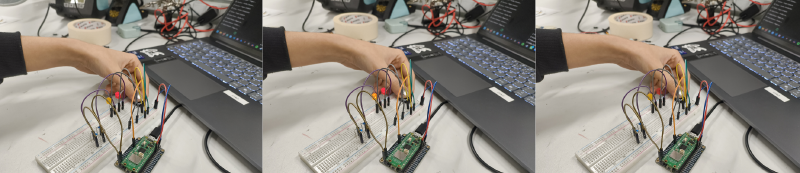
And these are some pictures I took of the circuit working. Respectively:
- Only the first LED on
- Both LEDs on
- Both LEDs off