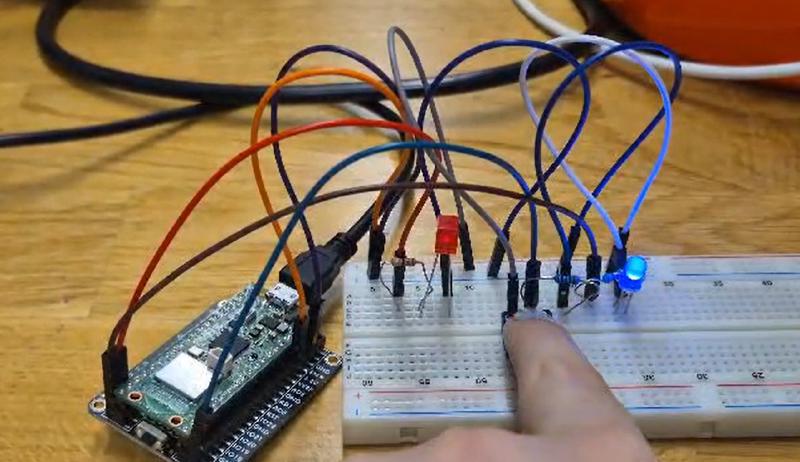
This week’s task was to connect LEDs to a single button. Depending on how many times you press the button is what happens with the LEDs:
- The first time you press the button, the LEDs would go from both off to LED 1 on and LED 2 off.
- If you press the button a second time, both LEDs would turn on.
- If you press the button a third time, both would return to being off.
- Lastly, if you press the button once more, the cycle would repeat, turning LED 1 on.
The difficulties #
Now, this sounds nice and easy, but for me, it came with unexpected complications.
Creating the states: #
As pushing the button is just a 0 or a 1 to the signal, the Arduino wouldn’t know if you pressed it a second a third or an eleventh time; that is, unless you create states. The tricky part for me was trying to understand that I didn’t need to put every command in three different scenarios (pressing button once, twice or thrice), but that I could also make reference to them in another if statement. This meant changing the logic a little from this:
if (button==HIGH && state==1) {
    digitalWrite(led1, HIGH);
    digitalWrite(led2, LOW);

    state++;
To this:
if (state == 1) {
    digitalWrite(led1, HIGH);
    digitalWrite(led2, LOW);

    Serial.println(state);
  }
What happens when…: #
This was the most difficult part, as I thought I had just solved the homework after the previous issue, only to realize that a bit bellow the instructions was a red block that said “Test your code and circuit for bugs” and the question “Hold the button down for a long time, what happens?”. I held the button down and came to the realization that the states were looping non-stop, Little did I know that fixing this would be my own personal hell for the next 8 hours.
What made solving this issue particularly difficult for me was, first of all, understanding what logic would stop this situation and even more so, to explain it to the computer in its language. But after some hours of yelling at my pc, some clues by Matti (and some group brainstorming) I understood what was the issue and how to solve it in a way that the computer would understand it, and lo and behold it worked!
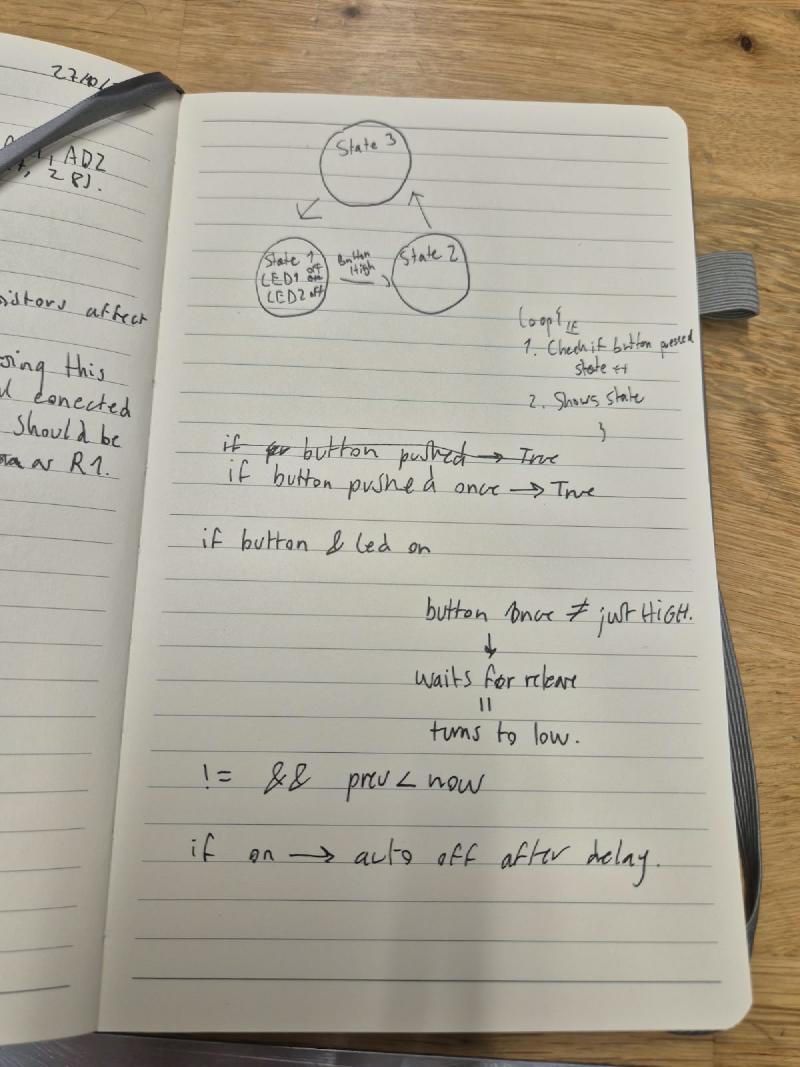
The thing I needed the computer to do was pretty simple in theory: to not move on to the next state, unless the button was pressed again, which for me, in computer language it came in the form of two more variables: button and lastButtonState, along with a different if statement. With this, lastButtonState would store the last value of the button, which in turn meant now I could clarify that if the states of the button are different and also if the current state was larger than the previous one, the counter of the code would go on to the next scenario. This would stop the loop because the button will have to change from HIGH to LOW for it to actually be able to move forward in the LEDs actions (because HIGH is different than LOW and ++also++ bigger than LOW, as HIGH is 1 and LOW is 0).
if(button != lastButtonState && button>lastButtonState){
    // print the changed state
    button==HIGH;
    state++;

    if (state > 2) {
      state = 0;
    }
  }
This is the very powerful bit of code that saved this issue in the end.
Code #
And so this is the code that I made in the end:
int button=0;
int state = 0;
int led1;
int led2;
int lastButtonState=0;

void setup() {

  pinMode(15, OUTPUT);
  pinMode(14, OUTPUT);
  pinMode(16, INPUT);
  // HIGH = 3.3V
  //LOW = 0V
  Serial.begin(9600);
}

void loop() {

  button = digitalRead(16);
  led1 = 15;
  led2 = 14;

  button = digitalRead(16);

  if(button != lastButtonState && button>lastButtonState){
    button==HIGH;
    state++;

    if (state > 2) {
      state = 0;
    }
  }

  if (state == 0) {
    digitalWrite(led1, LOW);
    digitalWrite(led2, LOW);

    Serial.println(state);
    }


  if (state == 1) {
    digitalWrite(led1, HIGH);
    digitalWrite(led2, LOW);

    Serial.println(state);
  }


  if (state == 2) {
    digitalWrite(led1, HIGH);
    digitalWrite(led2, HIGH);

    Serial.println(state);
  }

  lastButtonState = button;
  delay(50);
}