My assumption for completing this exercise was that I needed an array in which I could store information about which phase of the loop the circuit was in (LED 1 on, LED 2 on, LEDs off).
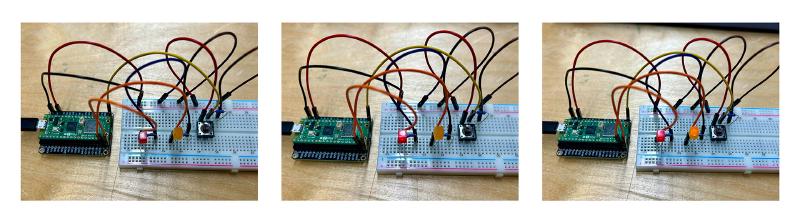
The easiest part of the exercise was connecting the physical components on the breadboard, it was not much different from the exercises we did in class. The only problem I encountered was using the wrong resistor, so one LED was not turning on.
The hardest part was writing the code, because even if I knew in theory how it was supposed to work, I had some trouble actually getting it to function. Specifically, I had problems connecting the btnState with the btnArray position.
#include <Arduino.h>

int btnPin = 16;
int ledPinA = 15;
int ledPinB = 14;
int btnState = 0;
int btnArray[2] = {0, 0};
int prevBtnState = 0;

void setup() {
  Serial.begin(9600);
  pinMode(btnPin, INPUT);
  pinMode(ledPinA, OUTPUT);
  pinMode(ledPinB, OUTPUT);
}

void loop() {
  btnState = digitalRead(btnPin);

  if (btnState != prevBtnState && btnState == HIGH) {

    if (btnArray[0] == 0) {
      btnArray[0] = 1;
      digitalWrite(ledPinA, HIGH);
    }
    else if (btnArray[0] == 1) {
      btnArray[0] = 2;
      digitalWrite(ledPinB, HIGH);
      digitalWrite(ledPinA, HIGH);
    }
    else if (btnArray[0] == 2) {
      btnArray[0] = 0;
      digitalWrite(ledPinB, LOW);
      digitalWrite(ledPinA, LOW);
    }
  }

  prevBtnState = btnState;
}