Initial Minimum Viable Test #
Blow Structure Test #
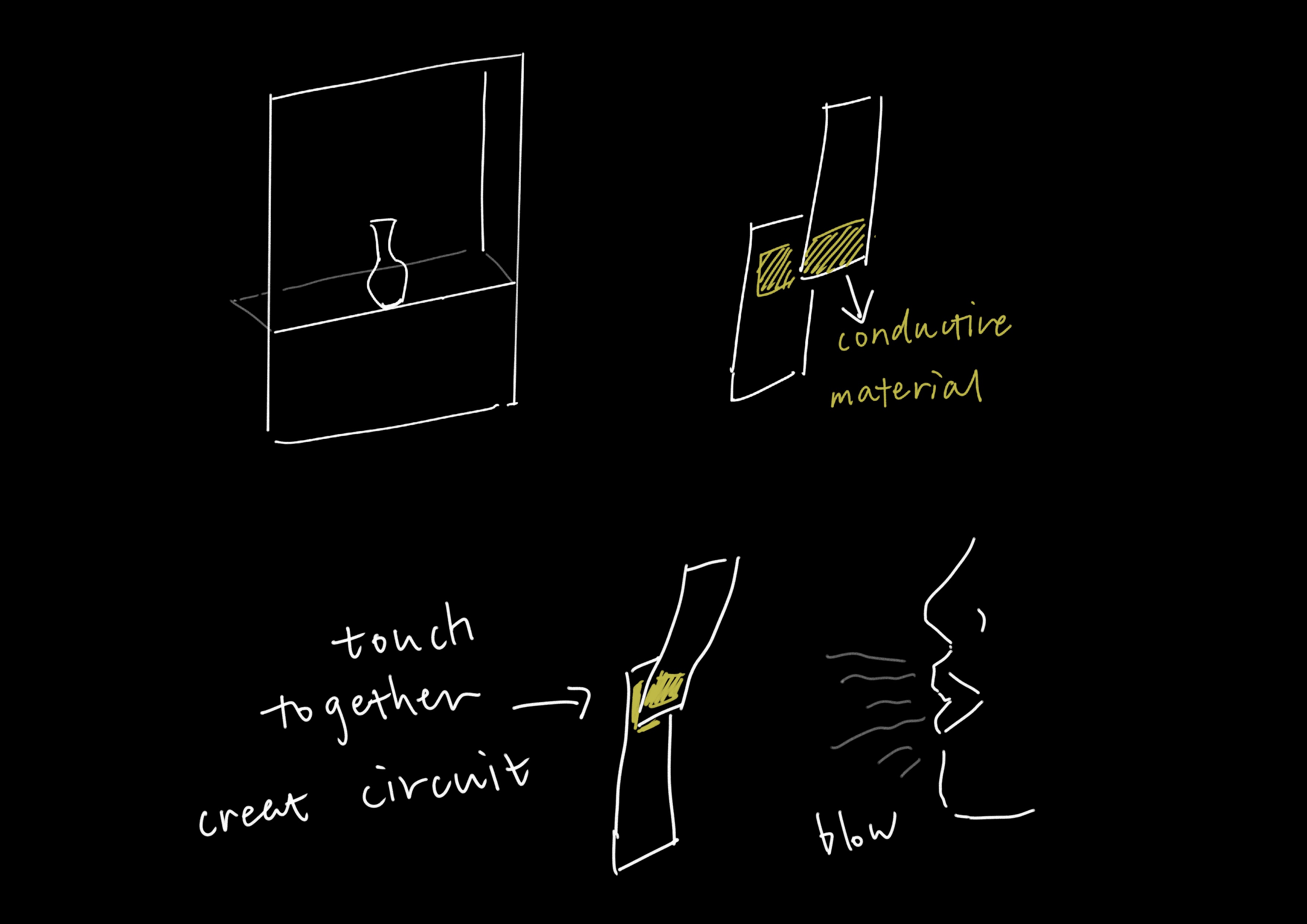
At first the circuit counldn’t give the correct HIGH/LOW signal as I expected. From Matti I know there is two problems:
- The glue on the back of the conductive tape is not conductive, so you can’t make it discontinuous;
- Matti suggest for testing I should use bread board to connect the components to prevent the unstable serial transformation.
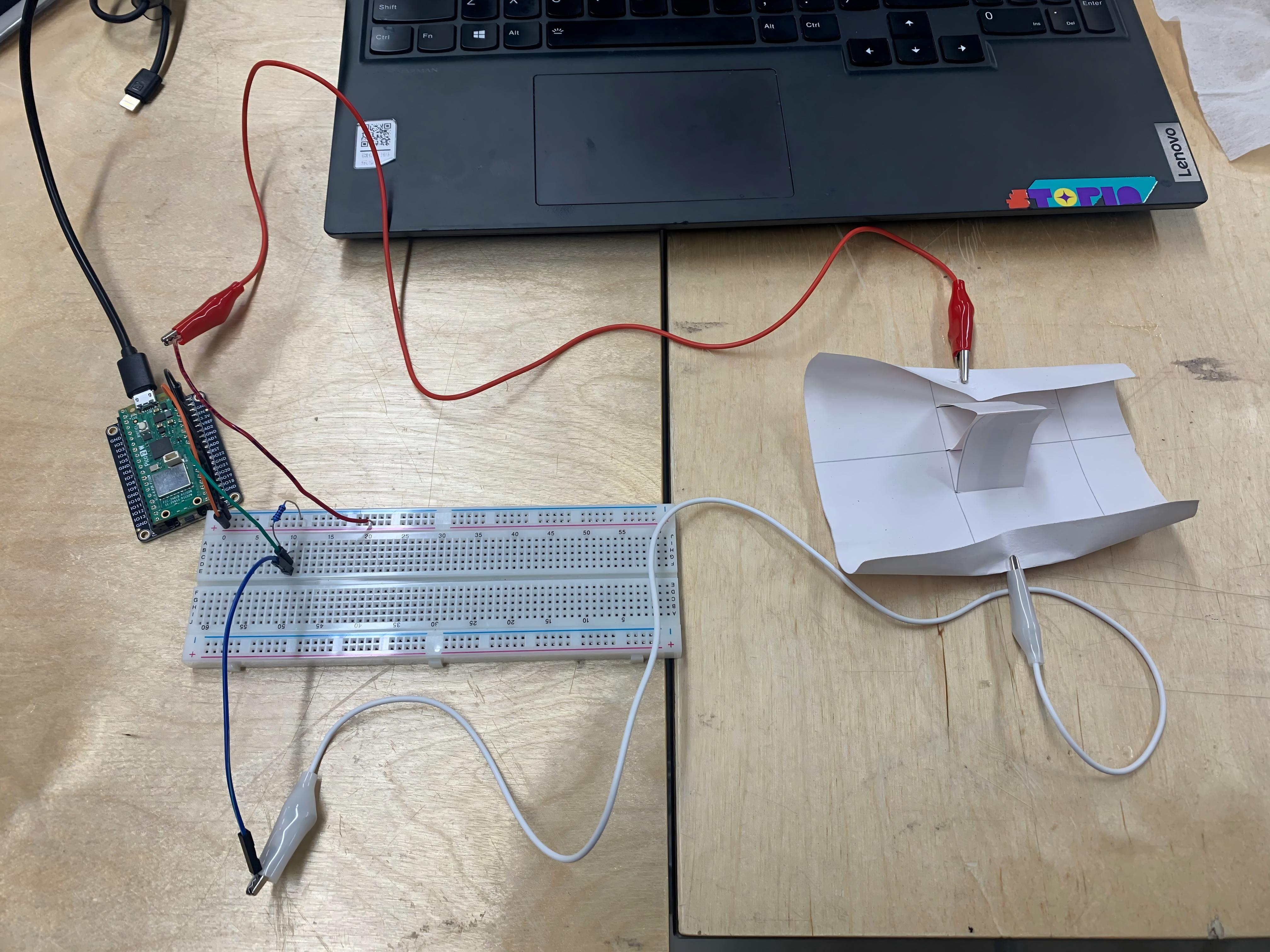
Arduino & Processing Connection #
This is my initial Arduino code:
int i;

void setup() {
  // put your setup code here, to run once:
  Serial.begin(9600);
  pinMode(21,INPUT);
}

void loop() {
  // put your main code here, to run repeatedly:
  i = digitalRead(21);
  Serial.println(i);
}
and here is the Processing code:
import processing.serial.*;
Serial myPort;  // Create object from Serial class
int val;     // Data received from the serial port

void setup()
{
  // On Windows machines, this generally opens COM1.
  // Open whatever port is the one you're using.
  String portName = Serial.list()[2]; //change the 0 to a 1 or 2 etc. to match your port
  myPort = new Serial(this, portName, 9600);
}

void draw()
{
  println(val);
}
But the problem is the signal look fine in the arduino serial monitor, but in processing I can’t print the signal. It only shows 0. With Matti’s help I know that there are several problems behind:
- The speed arduino sending the signals is faster than the processing refeshing(60FPS), so I need to add a
delay(30)in arduino. This is the explaination of Gemini: set the Arduino delay to 30ms (approx. 33Hz) to maintain a safe 1:2 ratio with Processing’s 60Hz read rate, ensuring the buffer clears faster than it fills to prevent data backlog.- The code
println(val)is not actually getting the serial data so that I need to usestr = myPort.readStringUntil('\n');. But this only gets theStringtype of data(pure text) but I needintorfloat, so Matti says I need use thisval = float(str);to force the data become a float. But at first we want to tryint(), but there is some unknown error, but float works fine. The code I got that can actually work is this:
import processing.serial.*;
Serial myPort;  // Create object from Serial class
float val;     // Data received from the serial port
String str;

void setup()
{
  // On Windows machines, this generally opens COM1.
  // Open whatever port is the one you're using.
  println(Serial.list());

  String portName = Serial.list()[0];
  myPort = new Serial(this, portName, 9600);

  //myPort.bufferUntil('\n');
}

void draw()
{
  background(255);
  if ( myPort.available() > 0) {  // If data is available,
    str = myPort.readStringUntil('\n');  // read it and store it in str
    //
    //println(str);
    if(str != null){
      //String[] splitData = split(str, ","); // I'll need this for more int
      val = float(str); // change the text we get into real number we can do calculation
     // y = float(splitData[1]);
     // z = float(splitData[2]);
    }
  }

  println(val);
  text(val,20,20);
}
Here is the final prototype that works with simple visual in processing:
Ball-Slide Sensor Structure Test #
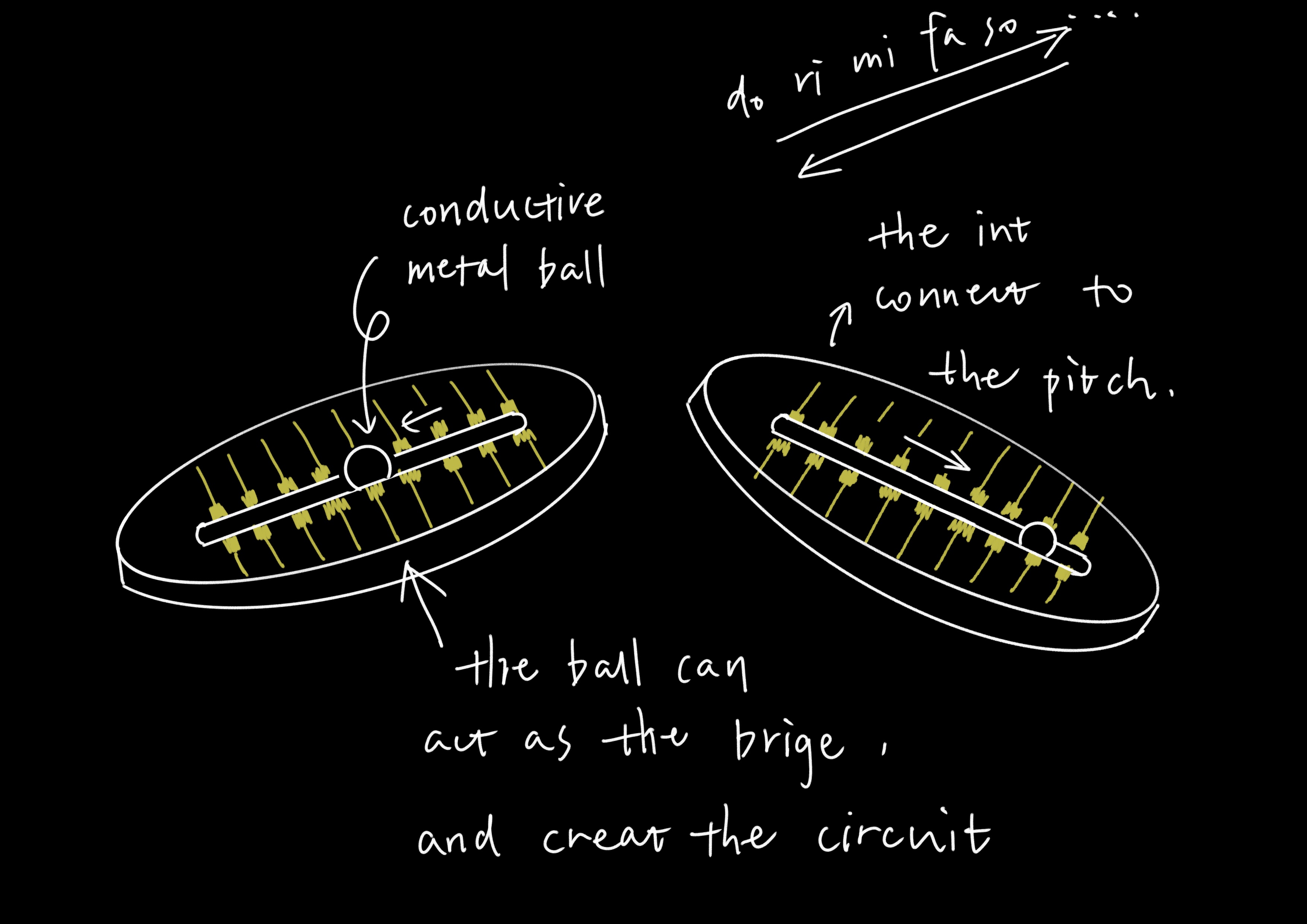
The first version works if I use conductive tap to be the bridge of every pair of interrupts, but I failed to reach my goal of using the ball as trigger. Here is the initial version that failed:
There are several reasons I concluded from this:
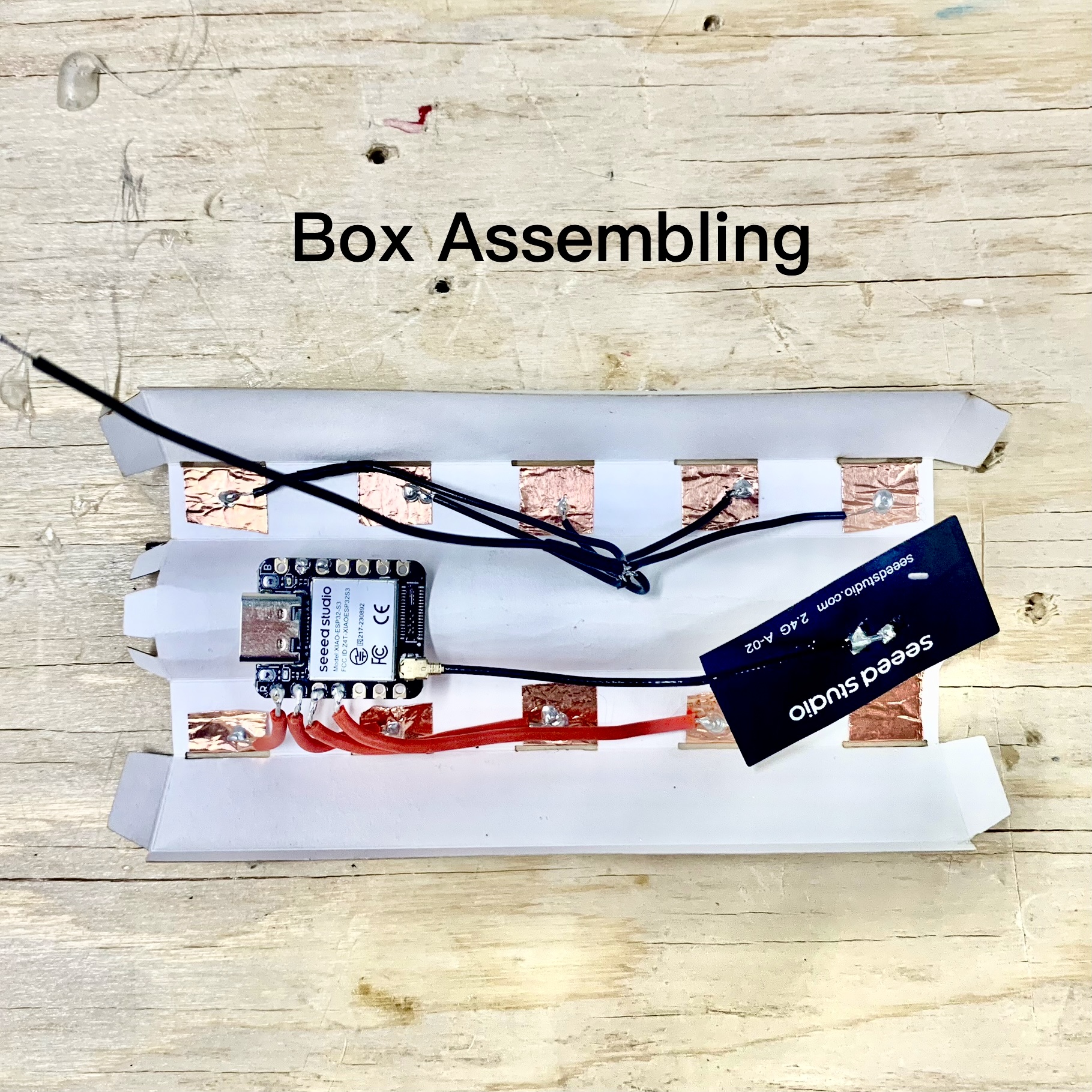
- The width of the conductive tap areas now is 5mm, is should be bigger for the ball to touch and stay;
- The diameter of ball I use now is 6mm, I should use bigger ball to increase the conductive area(so I got myself some 1.2mm large ones);
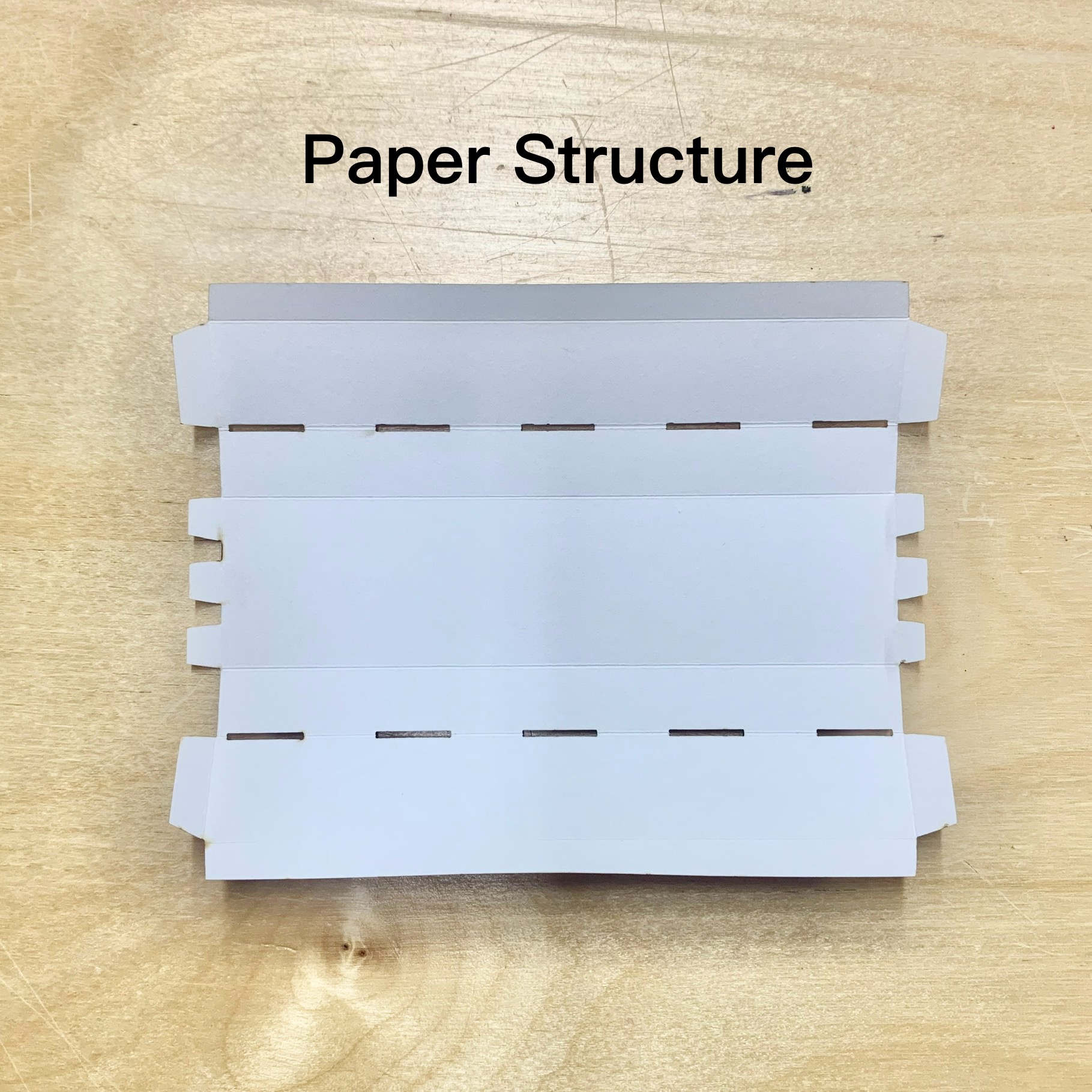
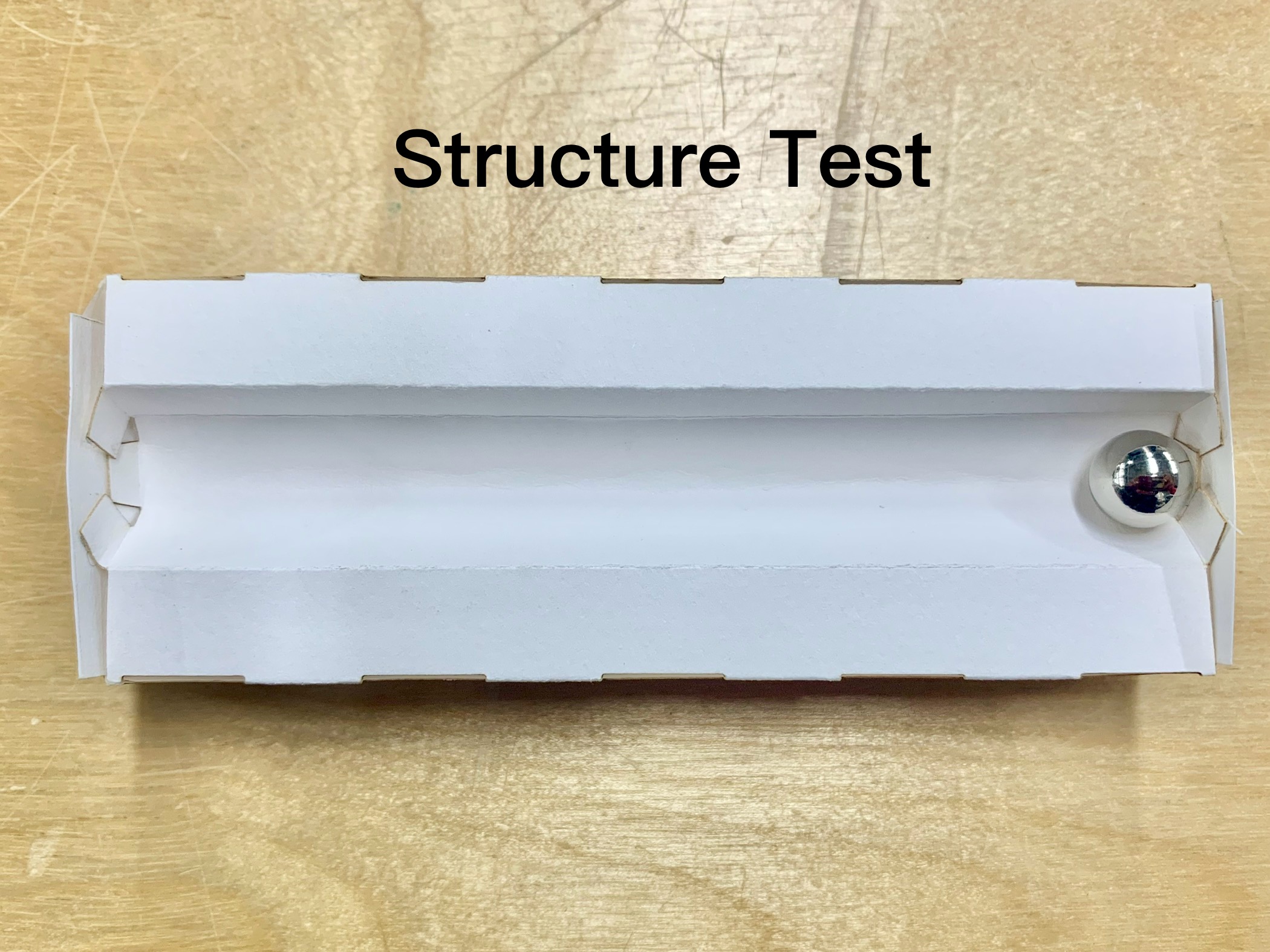
- Also for increasing the conductive region, instead to the current flat structure, I should use a “U valley” shape as the ball-rolling zone.
The second prototype version can give me a signal when I pivoted the box up side down! But to make this stable, I must squeeze this box a little bit to provide more contact area between the ball and the surface, which means that I should design a structure that bends to fit the ball shape.
Paper Folding Sensor Structure Test #
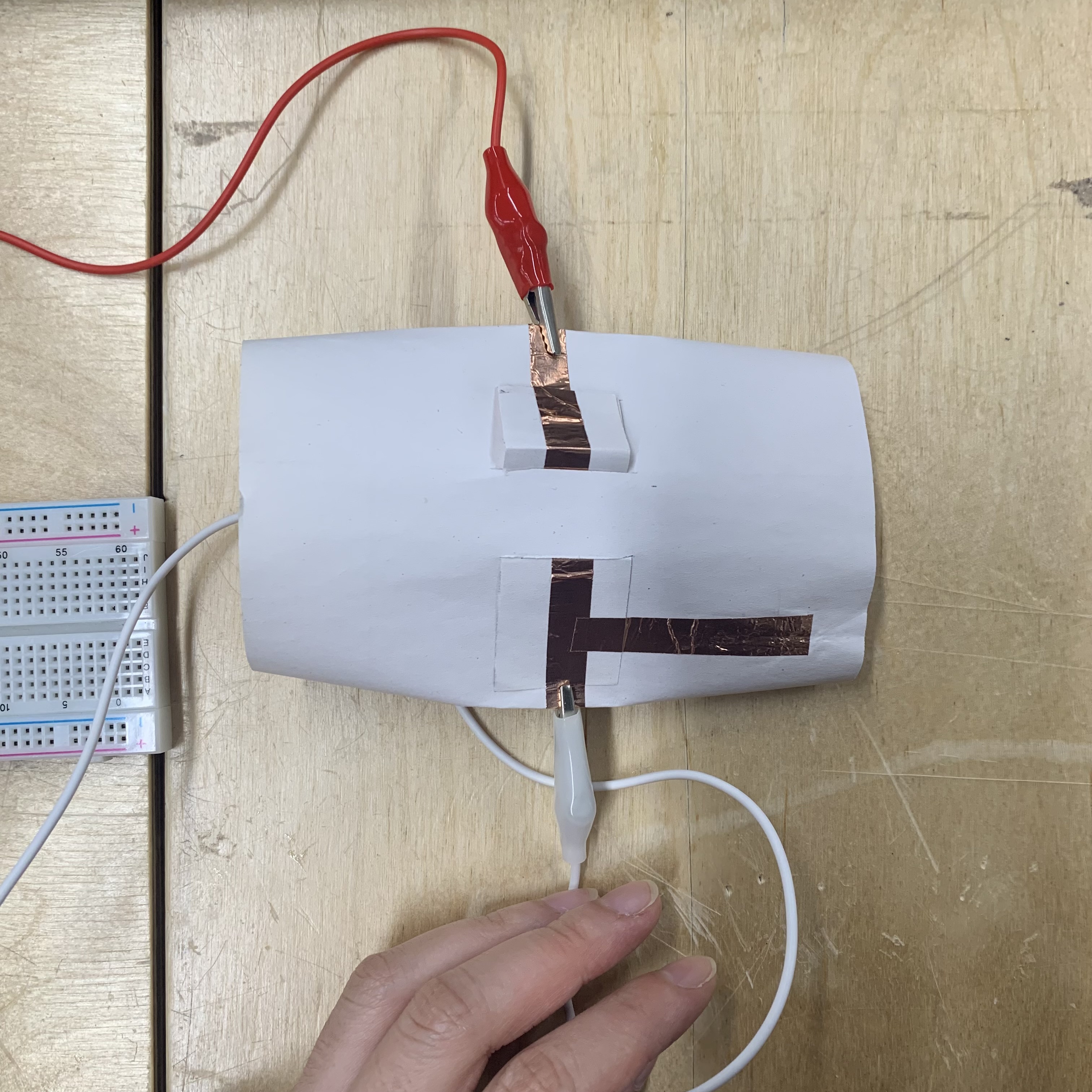
When I was introducing this idea to everyone in our class, it is really interesting to find that people all played this before, so I guess this interaction must be a fun experience as a connection of their childhood memories and familiar gestures. The final prototype works like this:
Although in concern of time, I don’t have enough effort to use this sensor as a trigger of something, but I think in the future I can do some with this. Also, I have summarized some after prototyping:
- The electric wires should use the soft ones with more flexibility;
- The plus and minus side soldering should be carefully avoided touching when pressing two side together.
Final Prototype Structure #
Coding Part #
Arduino Code #
Ball OSC_codeToProcessing #
#include <WiFi.h>
#include <ArduinoOSCWiFi.h>

// WiFi stuff
const char* ssid = "mainframe";
const char* pwd = "12345678";

// OSC setting
// computer ip address
const char* host = "192.168.50.231";
const int recv_port = 12345;    // Arduino recieve com
const int publish_port = 54321; // Arduino send com

float ballA,ballB,ballC,ballD,ballE;

void setup() {
  // put your setup code here, to run once:
  Serial.begin(9600);

  // WiFi ------------------>
  // WiFi stuff (no timeout setting for WiFi)
    WiFi.mode(WIFI_STA);

    // Connect to the WiFi network
    WiFi.begin(ssid,pwd);
    while (WiFi.status() != WL_CONNECTED) {
        Serial.print(".");
        delay(500);
    }

    Serial.print("WiFi connected, IP = ");
    Serial.println(WiFi.localIP()); // print arduino's own IP

    // subscribe to receive osc messages that control the robot
    OscWiFi.subscribe(recv_port, "/control",
        [](const OscMessage& m) {
            Serial.print(m.remoteIP());
            Serial.print(" ");
            Serial.print(m.remotePort());
            Serial.print(" ");
            Serial.print(m.size());
            Serial.print(" ");
            Serial.print(m.address());
            Serial.print(" ");
            Serial.print("Value: ");
            float val = m.arg<float>(0);
            Serial.println(val);
        });

  //ball pin
  pinMode(D0,INPUT_PULLUP);
  pinMode(D1,INPUT_PULLUP);
  pinMode(D2,INPUT_PULLUP);
  pinMode(D3,INPUT_PULLUP);
  pinMode(D4,INPUT_PULLUP);
}

void loop() {
  // update the OSC sending and receiving
  OscWiFi.update();

  // put your main code here, to run repeatedly:
  //ball serial define
  ballA=digitalRead(D0);
  ballB=digitalRead(D1);
  ballC=digitalRead(D2);
  ballD=digitalRead(D3);
  ballE=digitalRead(D4);

  OscWiFi.send(host, publish_port, "/sensors",
      ballA,    // index 1
      ballB,    // index 2
      ballC,    // index 3
      ballD,    // index 4
      ballE     // index 5
  );

  Serial.print("A: ");
  Serial.print(ballA);
  Serial.print("B: ");
  Serial.print(ballB);
  Serial.print("C: ");
  Serial.print(ballC);
  Serial.print("D: ");
  Serial.print(ballD);
  Serial.print("E: ");
  Serial.println(ballE);

  delay(30);
}
BLOW_OSC_codeToProcessing #
#include <WiFi.h>
#include <ArduinoOSCWiFi.h>

// WiFi stuff
const char* ssid = "mainframe";
const char* pwd = "12345678";

// OSC setting
// computer ip address
const char* host = "192.168.50.231";
const int recv_port = 12345;    // Arduino recieve com
const int publish_port = 54321; // Arduino send com

float blow;

void setup() {
  // put your setup code here, to run once:
  Serial.begin(9600);

  // WiFi ------------------>
  // WiFi stuff (no timeout setting for WiFi)
    WiFi.mode(WIFI_STA);

    // Connect to the WiFi network
    WiFi.begin(ssid,pwd);
    while (WiFi.status() != WL_CONNECTED) {
        Serial.print(".");
        delay(500);
    }

    Serial.print("WiFi connected, IP = ");
    Serial.println(WiFi.localIP()); // print arduino's own IP

    // subscribe to receive osc messages that control the robot
    OscWiFi.subscribe(recv_port, "/control",
        [](const OscMessage& m) {
            Serial.print(m.remoteIP());
            Serial.print(" ");
            Serial.print(m.remotePort());
            Serial.print(" ");
            Serial.print(m.size());
            Serial.print(" ");
            Serial.print(m.address());
            Serial.print(" ");
            Serial.print("Value: ");
            float val = m.arg<float>(0);
            Serial.println(val);
        });

  //blow pin
  pinMode(D10,INPUT_PULLUP);
}

void loop() {
  // update the OSC sending and receiving
  OscWiFi.update();

  // put your main code here, to run repeatedly:
  //blow serial define
  blow=digitalRead(D10);

  OscWiFi.send(host, publish_port, "/sensors_2",
      blow
  );

  // 1. Blow
  Serial.print("ValBlow: ");
  Serial.println(blow);

  delay(30);
}
Processing Code #
// connect arduino with processing
import oscP5.*;
import netP5.*;
OscP5 oscP5;
NetAddress myRemoteLocation;

float valBlow, prevBlow=0, blowCount=0; // reserve sata received from the serial port
float valBallA,valBallB,valBallC,valBallD,valBallE;

//Box2D library
import shiffman.box2d.*;
import org.jbox2d.common.*;
import org.jbox2d.dynamics.joints.*;
import org.jbox2d.collision.shapes.*;
import org.jbox2d.collision.shapes.Shape;
import org.jbox2d.common.*;
import org.jbox2d.dynamics.*;
import org.jbox2d.dynamics.contacts.*;
Box2DProcessing box2d;
Boundary mainFloor; // save the floor

//Boundary part
ArrayList<Boundary> walls; //save the walls
//the variable need for boundary transformation
float ang, smoothFactor=0.1, activeAng; // the angle for the boundary twist
float BallPins[] = {valBallA,valBallB,valBallC,valBallD,valBallE};
float targetAngles[] = {radians(30), radians(14.5), radians(0), radians(-14.5), radians(-30)};
float smoothingFactor = 0.1;
float finalTarget = 0;
boolean isSoundActive;

//Object part
String[] dictA = {"but", "time", "is", "a", "wind", "that", "never", "stops", "blowing", "from", "dust", "we", "rise", "and", "to", "dust", "we", "shall", "return", "breaking", "apart", "into", "atoms", "into", "memories", "into", "light"};
String[] dictB = {"we", "are", "made", "of", "starstuff", "we", "are", "a", "way", "for"};
String[] dictC = {"a", "fleeting", "moment", "of", "being","in", "the", "vast", "design", "gravity", "holds", "us", "for", "a", "while"};
String[] dictD = {"the", "cosmos", "to", "know", "itself"};

Dandelion[] dandelions = new Dandelion[4];
Body centerAnchor;
//delay the trigger
boolean isWaiting = false;
int startTime = 0;
int targetIndex = -1;

//the center coordinates
float ori_X;
float ori_Y;
boolean isBlown = false;

//the sound part
import ddf.minim.*;
Minim minim;
AudioPlayer windPlayer;
AudioPlayer bgMusic;
float targetPan, currentPan = 0.5;

//reset the dandelion
int resetStartTime = 0;
boolean isResetting = false;


void setup()
{
  size(1920,1080);

  //OSC setting
  frameRate(60);
  //XIAO send ---> processing
  oscP5 = new OscP5(this, 54321);
  //processing gives order to ---> XIAO //maybe I dont need but keep it
  myRemoteLocation = new NetAddress("192.168.50.172", 12345);

  minim = new Minim(this);
  windPlayer = minim.loadFile("soft_wind.mp3"); //load the widn sound effect
  windPlayer.setGain(10.0);
  bgMusic = minim.loadFile("bg_forest.mp3");
  bgMusic.loop();
  bgMusic.setGain(5.0);

  //give value to the center of the dandelion
  ori_X = width/2;
  ori_Y = 200;

  //Box2D part
  box2d = new Box2DProcessing(this);
  box2d.createWorld();
  box2d.setGravity(0, -50);
  mainFloor = new Boundary(width/2, height + 100, width+300, 300, radians(ang));
  walls = new ArrayList<Boundary>();
  walls.add(new Boundary(0, height/2, 20, height, 0)); //left wall
  walls.add(new Boundary(width, height/2, 20, height, 0));

  //Object dandelions
  float spacing = width / 5.0;
  dandelions[0] = new Dandelion(width/2-350, height*0.65, 90, 90, 90, 20, 90, dictB);
  dandelions[1] = new Dandelion(width/2+450, height*0.72, -90, 40, -90, 40, 90, dictD);
  dandelions[2] = new Dandelion(width/2+150, height*0.55, -90, 90, -20, -20, 110, dictC);
  dandelions[3] = new Dandelion(width/2-220, height*0.35, 160, 160, 160, 90, 120, dictA);

  box2d.listenForCollisions();
}

void draw()
{
  //refresh the BallPins value
  BallPins = new float[]{valBallA, valBallB, valBallC, valBallD, valBallE};

  background(0);

  //serials shows on the window
  fill(255);
  textSize(15);
  text("Blow"+valBlow,40,100);
  text("valBallA"+valBallA,40,140);
  text("valBallB"+valBallB,40,160);
  text("valBallC"+valBallC,40,180);
  text("valBallD"+valBallD,40,200);
  text("valBallE"+valBallE,40,220);

  //sound panning part
  if(valBallA == 1)      targetPan = 0.0;
  else if(valBallB == 1) targetPan = 0.25;
  else if(valBallC == 1) targetPan = 0.5;
  else if(valBallD == 1) targetPan = 0.75;
  else if(valBallE == 1) targetPan = 1.0;
  //println(targetPan);

  currentPan=currentPan+(targetPan-currentPan)*smoothFactor;
  float minimPan = map(currentPan,0,1,-1,1);
  windPlayer.setPan(minimPan);

  //detect blow
  if (valBlow == 1 && prevBlow == 0)
  {
    if (!isWaiting)
    {
      int foundIndex = -1;

      //go through all the dandelions, find the first !isBlown
      for (int i = 0; i < dandelions.length; i++)
      {
        if (dandelions[i].isBlown == false)
        {
          foundIndex = i;
          windPlayer.rewind();
          windPlayer.play();
          break; //if find, stop loop
        }
      }

      //if find a dandelion that is not blown
      if (foundIndex != -1)
      {
        targetIndex = foundIndex;
        startTime = millis(); // recored time
        isWaiting = true;     // start to break mode
      }
    }
  }

  if (isWaiting)
  {
    if (millis() - startTime >= 800)
    {
      if(targetIndex != -1 && targetIndex < dandelions.length)
      {
         dandelions[targetIndex].blow();
      }
      isWaiting = false;
    }
  }
  prevBlow = valBlow; //refresh last state

  Vec2 wind = new Vec2(50, random(-10, 10));
  //Dandelion display
  for (Dandelion d : dandelions)
  {
    d.display();
    d.applyWind(wind);
  }

  //Box2D part
  box2d.step();
  mainFloor.display();
  //boundary display
  for (Boundary wall: walls)
  {
    wall.display();
  }
  turn(); // execute boundary transformation

  //reset dandelion
  boolean allBlown = true;
  //detect whether all of them has bee blown
  for (Dandelion d : dandelions)
  {
    if (!d.isBlown)
    {
      allBlown = false;
      break;
    }
  }

  if (allBlown && !isResetting)
  {
    resetStartTime = millis();
    isResetting = true;
  }

  //if in resetMode, check time, execute reset after 5s
  if (isResetting)
  {
    if (millis() - resetStartTime > 15000)
    {
      for (Dandelion d : dandelions) //execute reset
      {
        d.reset();
      }
      isResetting = false;
      blowCount = 0;
      targetIndex = -1;
      isWaiting = false;
    }
  }
}

//get the signal from arduino
void oscEvent(OscMessage theOscMessage)
{
  if (theOscMessage.checkAddrPattern("/sensors") == true)
  {
    valBallA = 1-theOscMessage.get(0).floatValue();
    valBallB = 1-theOscMessage.get(1).floatValue();
    valBallC = 1-theOscMessage.get(2).floatValue();
    valBallD = 1-theOscMessage.get(3).floatValue();
    valBallE = 1-theOscMessage.get(4).floatValue();
    println("matti_1");
  }
  if (theOscMessage.checkAddrPattern("/sensors_2") == true)
  {
    valBlow  = 1-theOscMessage.get(0).floatValue();
    println("matti_2");
  }
}
Boundary #
class Boundary
{
  // A boundary is a simple rectangle with x,y,width,and height
  float x,y,w,h,angle;

  // But we also have to make a body for box2d to know about it
  Body b;

  Boundary(float x,float y, float w, float h, float angle)
  {
    this.x = x;
    this.y = y;
    this.w = w;
    this.h = h;
    this.angle = angle;

    PolygonShape sd = new PolygonShape();
    // Figure out the box2d coordinates
    float box2dW = box2d.scalarPixelsToWorld(w/2);
    float box2dH = box2d.scalarPixelsToWorld(h/2);
    // We're just a box
    sd.setAsBox(box2dW, box2dH);

    // Create the body
    BodyDef bd = new BodyDef();
    bd.type = BodyType.KINEMATIC;
    bd.position.set(box2d.coordPixelsToWorld(x,y)); //send boundary position to libray
    //processing is clockwise, Box2D is anticlockwise
    bd.angle = -angle; // send angle
    b = box2d.createBody(bd); // create object

    // Attached the shape to the body using a Fixture, name of this Fixture is fd
    FixtureDef fd = new FixtureDef();
    fd.shape = sd;
    fd.density = 1;
    // Friction: 0(like ice), 1(sticky like glue)
    fd.friction = 0.1;
    fd.restitution = 0.5;
    // create this Fixture fd
    b.createFixture(fd);
    b.setUserData(this);
    b.setUserData(this);
  }

  void display()
  {
    fill(0);
    stroke(0);
    rectMode(CENTER);

    pushMatrix();
    translate(x,y);
    rotate(angle);
    rect(0,0,w,h);
    popMatrix();
  }

  void updateAngle(float newAngle) {
    this.angle = newAngle;

    // get the new position of boundary in Box2D world
    Vec2 currentPos = b.getPosition();

    //let the position fit possessing clockwise direction
    b.setTransform(currentPos, -newAngle);
  }
}
Boundary Twist #
void turn()
{
  int currentIndex = -1;
  for(int i=0; i<BallPins.length; i++)
  {
    if(BallPins[i]==1.0)
    {
      currentIndex = i;
    }
  }
  if(currentIndex != -1)
  {
    activeAng = targetAngles[currentIndex];
  }
  ang=ang+(activeAng-ang)*smoothFactor;
  mainFloor.updateAngle(ang);
  //println(ang);
}
Collision #
void beginContact(Contact cp)
{
  Fixture f1 = cp.getFixtureA();
  Fixture f2 = cp.getFixtureB();
  Body b1 = f1.getBody();
  Body b2 = f2.getBody();
  Object o1 = b1.getUserData();
  Object o2 = b2.getUserData();

  if (o1 == null || o2 == null) return;

  if (o1.getClass() == WordParticles.class && o2.getClass() == Boundary.class)
  {
    groundParticle((WordParticles) o1);
  }
  else if (o2.getClass() == WordParticles.class && o1.getClass() == Boundary.class)
  {
    groundParticle((WordParticles) o2);
  }

  else if (o1.getClass() == WordParticles.class && o2.getClass() == WordParticles.class)
  {
    WordParticles p1 = (WordParticles) o1;
    WordParticles p2 = (WordParticles) o2;

    if (p1.hasHitGround && !p2.hasHitGround)
    {
       groundParticle(p2);
    }
    else if (!p1.hasHitGround && p2.hasHitGround)
    {
       groundParticle(p1);
    }
  }
}

void groundParticle(WordParticles p)
{
  if (!p.hasHitGround)
  {
    p.hasHitGround = true;
    p.body.setLinearDamping(0.5);
    p.scheduleSound(); //trigger text particle sound
  }
}
Dandelion #
class Dandelion
{
  float x, y;                         //the center of the dandelion
  ArrayList<WordParticles> particles; //list of the seed
  ArrayList<Joint> joints;            //list of the joints
  Body centerAnchor;                  //list of the anchors
  boolean isBlown = false;
  float stemAlpha = 255;
  String[] dict;
  float radius;
  float cx1, cy1, cx2, cy2;          // the offset for drawing the stem lines

  Dandelion(float x, float y, float cx1, float cy1, float cx2, float cy2, float r, String[] dict)
  {
    this.x = x;
    this.y = y;
    this.dict = dict;
    this.radius = r;
    this.cx1 = cx1;
    this.cy1 = cy1;
    this.cx2 = cx2;
    this.cy2 = cy2;

    particles = new ArrayList<WordParticles>();
    joints = new ArrayList<Joint>();
    createBody();
  }

  void createBody()
  {
    //create the body
    BodyDef bd = new BodyDef();
    bd.position.set(box2d.coordPixelsToWorld(x, y));//send boundary position to libray
    bd.type = BodyType.STATIC;
    centerAnchor = box2d.createBody(bd);

    //create the seeds
    int totalSeeds = max(20,dict.length);

    for (int i = 0; i < totalSeeds; i++)
    {
      float angle = map(i, 0, totalSeeds, 0, TWO_PI);
      float px = x + this.radius * cos(angle);
      float py = y + this.radius * sin(angle);

      String txt = dict[i % dict.length];
      WordParticles p = new WordParticles(px, py, txt);
      particles.add(p);

      DistanceJointDef djd = new DistanceJointDef();
      djd.bodyA = centerAnchor;
      djd.bodyB = p.body;
      djd.length = box2d.scalarPixelsToWorld(this.radius);
      djd.frequencyHz = 3.0;
      djd.dampingRatio = 0.1;

      Joint j = box2d.world.createJoint(djd);
      joints.add(j);
    }
  }

  //start blowing
  void blow()
  {
    if (!isBlown)
    {
      for (Joint j : joints)
      {
        box2d.world.destroyJoint(j);
      }
      joints.clear();
      isBlown = true;
    }
  }

  void applyWind(Vec2 windForce)
  {
    if (isBlown)
    {
      for (WordParticles p : particles)
      {
        p.body.applyForce(windForce, p.body.getWorldCenter());
      }
      //if isBlown, let stem disapear
      if (stemAlpha > 0) stemAlpha = stemAlpha - 2;
    }
  }

  void display()
  {
    noFill();
    stroke(250, 255, 255, stemAlpha);
    strokeWeight(2);
    bezier(x, y, x + cx1, y + cy1, x + cx2, height - cy2, x, height);

    for (WordParticles p : particles)
    {
      p.updateSound(); // use for detect delay sound play
      p.display();
    }
  }

  void reset()
  {
    isBlown = false;
    stemAlpha = 255;

    int totalSeeds = particles.size();

    for (int i = 0; i < totalSeeds; i++)
    {
      float angle = map(i, 0, totalSeeds, 0, TWO_PI);
      float px = x + this.radius * cos(angle);
      float py = y + this.radius * sin(angle);

      WordParticles p = particles.get(i);
      p.resetPos(px, py);

      // the same with createBody
      DistanceJointDef djd = new DistanceJointDef();
      djd.bodyA = centerAnchor;
      djd.bodyB = p.body;
      djd.length = box2d.scalarPixelsToWorld(this.radius);
      djd.frequencyHz = 3.0;
      djd.dampingRatio = 0.1;

      Joint j = box2d.world.createJoint(djd);
      joints.add(j);
    }
  }
}
Text Particles Object #
class WordParticles
{
  float w;
  float h;
  String content;
  Body body;
  color col;
  boolean hasHitGround = false;

  //sound play variable
  boolean hasPlayed = false;
  boolean isScheduled = false;
  long triggerTime = 0;
  //every textParticle has its own sound
  AudioSample mySound;

  WordParticles(float x, float y, String c)
  {
    this.content = c;
    //col = color(random(50), random(100, 200), random(200, 255));//random blue
    col = 255;

    //load audio files according to text content
    try
    {
      //go to file data to find the name of its audio
      mySound = minim.loadSample(content + ".mp3", 512);
    }
    catch (Exception e)
    {
      println("Could not load sound for: " + content);
    }

    //set the physical box accodingt to the text size
    textSize(30);
    w = textWidth(content);
    h = textAscent() + textDescent();

    //padding
    float padding = 2;
    w = w + padding;
    h = h + padding;

    //create a object with w&h at the pos of (x,y)
    makeBody(new Vec2(x, y), w, h);
  }

  void display()
  {
    //invisible physical body part
    //get the position ofbody on screen
    Vec2 pos = box2d.getBodyPixelCoord(body);
    //get the rotate angle of body, save into a
    float a = body.getAngle();

    //draw this object on window according to the pos&rotate of the body
    pushMatrix();
    translate(pos.x, pos.y);
    rotate(-a);

    fill(col);
    noStroke();
    textAlign(CENTER, CENTER);
    textSize(28);
    text(content, 0, 0);
    popMatrix();
  }

  //create a body with physical attributes in Box2D world
  void makeBody(Vec2 center, float w, float h)
  {
    this.w= w;
    this.h = h;

    //body define
    BodyDef bd = new BodyDef();
    bd.type = BodyType.DYNAMIC;
    bd.position.set(box2d.coordPixelsToWorld(center));//screen to world coordinates switch

    //high damping makes it float like a seed/feather
    bd.linearDamping = 8;
    bd.angularDamping = 1.0;

    //the birth of this body
    body = box2d.createBody(bd);
    //let the object change physical state accorfing to boundary twist
    body.setSleepingAllowed(false);

    //Figure out the box2d coordinates
    PolygonShape sd = new PolygonShape();
    float box2dW = box2d.scalarPixelsToWorld(w/2);
    float box2dH = box2d.scalarPixelsToWorld(h/2);
    sd.setAsBox(box2dW, box2dH);

    //defien fixture(texture)
    FixtureDef fd = new FixtureDef();
    fd.shape = sd;
    //low density so wind affects it easily
    fd.density = 0.5;
    fd.friction = 0.3;
    fd.restitution = 0.2;

    //attach the fixture to body
    body.createFixture(fd);
    body.setUserData(this);
    body.setAngularVelocity(random(-1, 1));
  }

  void resetPos(float x, float y)
  {
    Vec2 pos = box2d.coordPixelsToWorld(x, y);
    body.setTransform(pos, 0);       //return to previous position
    body.setLinearVelocity(new Vec2(0,0));
    body.setAngularVelocity(0);
    body.setLinearDamping(8.0);

    hasHitGround = false;
    hasPlayed = false;
    isScheduled = false;
  }

  void scheduleSound()
  {
    if (isScheduled || hasPlayed) return;

    isScheduled = true;
    int delay = (int)random(100, 11000);
    triggerTime = millis() + delay;
  }

  void updateSound()
  {
    if (isScheduled && !hasPlayed)
    {
      if (millis() >= triggerTime)
      {
        playSound();
        hasPlayed = true;
      }
    }
  }

  void playSound()
  {
     if (mySound != null)
     {
       float randomGain = random(-20.0, -80.0);
       mySound.setGain(randomGain);
       mySound.trigger();
     }
  }
}